Guia

Como usar Google Apps Script Copilot.

Una guia practica para aprovechar tu asistente de codigo con IA: instalacion, las cuatro funciones clave y habitos de usuarios avanzados.

Primeros pasos

Instala, inicia sesion y publica en 90 segundos.

Dos pasos. Sin archivos de configuracion. Sin CLI. Tu cuenta de Google hace el trabajo pesado.

Instalacion y configuracion

Install the Google Apps Script Copilot extension from the Chrome Web Store and sign in with the same Google account you use for Apps Script.

Como hacerlo
  1. Open the Chrome Web Store listing and add Google Apps Script Copilot to Chrome.
  2. Iniciar sesion with the Google account that owns your Apps Script projects.
  3. Open script.google.com and refresh the editor once after installing.
Ten en cuenta
  • Usa la cuenta de Google propietaria de tus proyectos de Apps Script
  • Concede los permisos solicitados para que el panel del IDE pueda cargarse
  • Fija la extensión en la barra de herramientas para confirmar que se cargó

Primer proyecto

Abre cualquier proyecto de Apps Script (o crea uno). Copilot monta un panel lateral dentro del IDE en cuanto se carga el proyecto.

Como hacerlo
  1. Open an existing Apps Script project or create a blank one.
  2. Wait for the Copilot panel to appear inside the editor.
  3. Ask a small first question, such as explaining the active file.
Ten en cuenta
  • Empieza con un proyecto pequeño para ver cómo se carga el contexto
  • Mantén nombres de archivo descriptivos: Copilot los usa como referencia
  • Guarda con frecuencia mientras experimentas; Apps Script conserva versiones por ti
Funciones principales

Las cuatro cosas que usaras cada dia.

Master these and you've mastered Copilot. Each workflow is explained in plain steps so you can try it immediately.

Modo chat

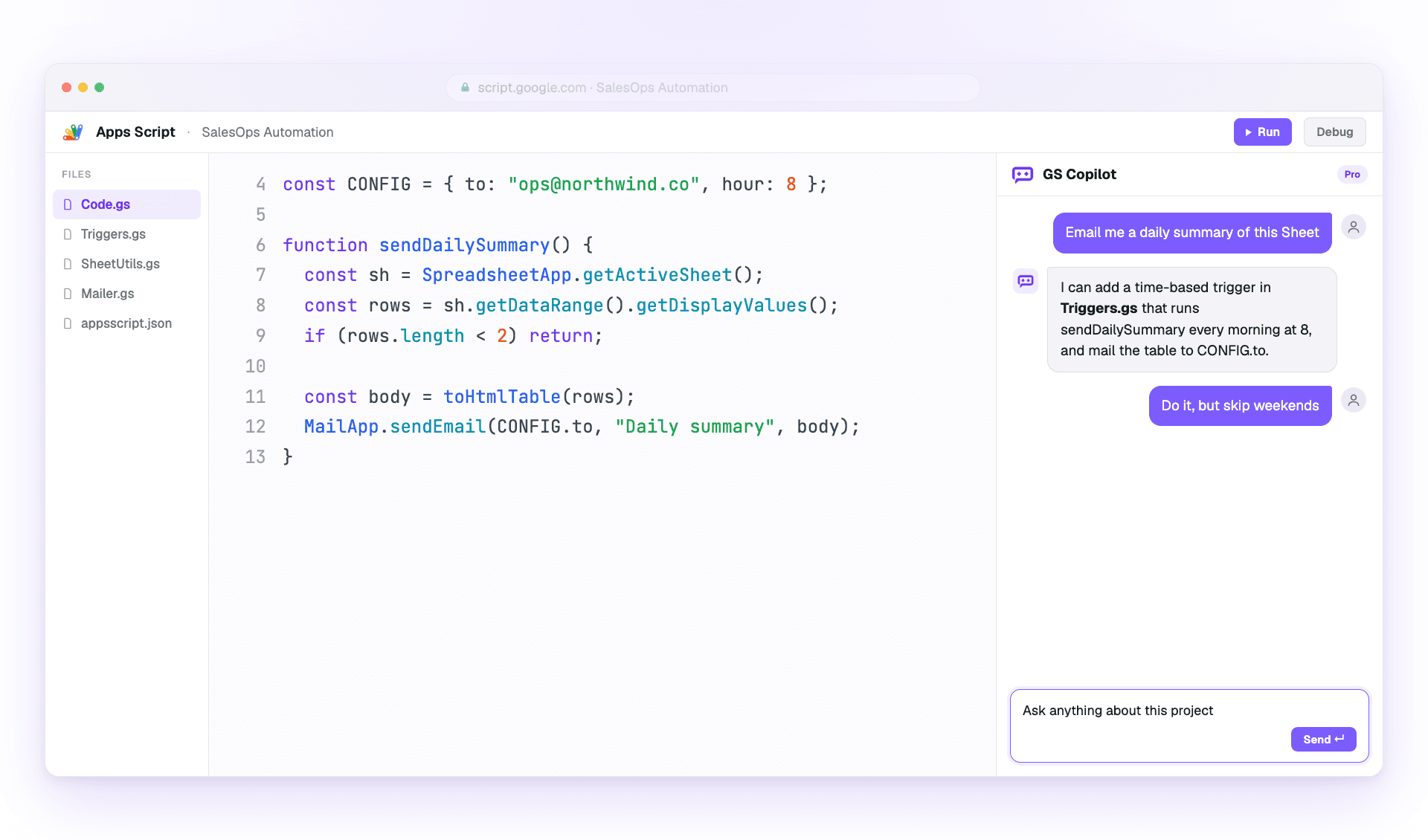
Use the side panel to ask questions, debug errors, and request changes with project context already attached.

Como hacerlo
  1. Open the Copilot panel beside your code.
  2. Describe the outcome you want in one or two sentences.
  3. Review the answer, then ask a follow-up or apply the suggested change.
Ten en cuenta
  • Sé específico sobre lo que quieres cambiar
  • Haz referencia a los nombres de las funciones en lugar de pegar código
  • Use follow-ups; Copilot remembers the thread

Sugerencias inline

Get ghost-text suggestions while you type, then accept only the parts that help.

Como hacerlo
  1. Place your cursor where the next code should go.
  2. Pause briefly so Copilot can read the surrounding context.
  3. Press Tab to accept or Esc to dismiss the suggestion.
Ten en cuenta
  • Mantén el cursor al final de la línea para obtener el mejor contexto
  • Write a short comment first when the next step is complex
  • Reject suggestions freely when they do not match your intent

Contexto multiarchivo

Attach the files that matter so Copilot understands triggers, helpers, libraries, and connected services.

Como hacerlo
  1. Open the context picker in the panel.
  2. Add the files involved in the task you are working on.
  3. Remove files that no longer matter before asking the next question.
Ten en cuenta
  • Include only the files the task de verdad touches
  • Keep file names descriptive for better grounding
  • Pin important files when you want them kept across the session

Historial de chat y ramas

Return to saved project conversations or branch from an earlier message when you want to try a different fix.

Como hacerlo
  1. Open chat history from the Copilot panel.
  2. Select the conversation that matches the project or bug.
  3. Fork from an older message before testing a different approach.
Ten en cuenta
  • Nombre important threads so they are easier to find
  • Fork before trying risky changes
  • Reuse a successful thread on similar bugs
Buenas practicas

Entrega mas rapido sin enviar errores.

Cómo los usuarios avanzados sacan el máximo partido de Copilot manteniendo su código revisable.

Prompts efectivos

Give Copilot the goal, the constraints, and the exact service you are using.

Como hacerlo
  1. Start with the outcome you want.
  2. Add the current error, file, function, or data shape.
  3. Ask for code plus a short explanation when the change is important.
Ten en cuenta
  • Empieza por el resultado, no por la implementación
  • Menciona los mensajes de error textualmente al depurar
  • Specify the service: SpreadsheetApp, DriveApp, or GmailApp
  • Pide explicaciones junto con el código

Calidad y seguridad del codigo

Treat AI output like a teammate's draft: useful, fast, and worth reviewing before it ships.

Como hacerlo
  1. Read the generated code before applying it.
  2. Run the smallest safe test you can.
  3. Move secrets into PropertiesService instead of prompts or source code.
Ten en cuenta
  • Prueba primero en una copia de la hoja
  • Validate every external input from forms or URL params
  • Keep changes small enough to review
  • Never paste secrets into a prompt