Guida

Come usare Google Apps Script Copilot.

Una guida pratica per sfruttare al meglio il tuo assistente di codice IA: installazione, quattro funzioni chiave e buone abitudini.

Per iniziare

Installa, accedi e pubblica in 90 secondi.

Due passaggi. Nessun file di configurazione. Nessuna CLI. Il tuo account Google esistente fa il lavoro pesante.

Installazione e configurazione

Install the Google Apps Script Copilot extension from the Chrome Web Store and sign in with the same Google account you use for Apps Script.

Come fare
  1. Open the Chrome Web Store listing and add Google Apps Script Copilot to Chrome.
  2. Accedi with the Google account that owns your Apps Script projects.
  3. Open script.google.com and refresh the editor once after installing.
Da ricordare
  • Usa l'account Google proprietario dei tuoi progetti Apps Script
  • Concedi le autorizzazioni richieste affinché il pannello dell'IDE possa caricarsi
  • Fissa l'estensione alla barra degli strumenti per confermare il caricamento

Primo progetto

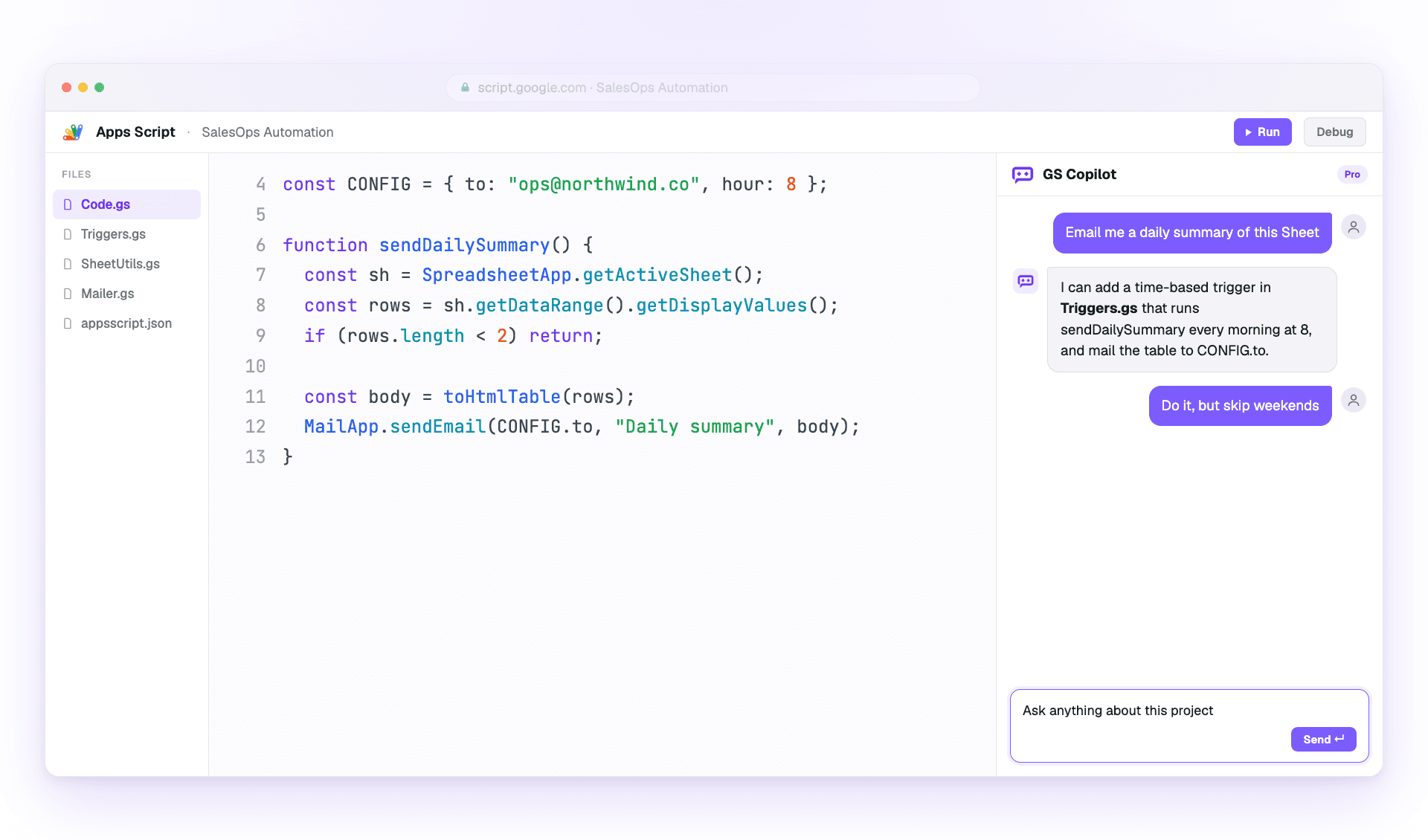
Apri qualsiasi progetto Apps Script (o creane uno). Copilot apre un pannello laterale nell'IDE non appena il progetto si carica.

Come fare
  1. Open an existing Apps Script project or create a blank one.
  2. Wait for the Copilot panel to appear inside the editor.
  3. Ask a small first question, such as explaining the active file.
Da ricordare
  • Inizia con un piccolo progetto per vedere come si carica il contesto
  • Mantieni nomi di file descrittivi — Copilot li usa come riferimento
  • Salva spesso mentre sperimenti; Apps Script conserva le versioni per te
Funzioni principali

Le quattro cose che userai ogni giorno.

Master these and you've mastered Copilot. Each workflow is explained in plain steps so you can try it immediately.

Modalita chat

Use the side panel to ask questions, debug errors, and request changes with project context already attached.

Come fare
  1. Open the Copilot panel beside your code.
  2. Describe the outcome you want in one or two sentences.
  3. Review the answer, then ask a follow-up or apply the suggested change.
Da ricordare
  • Sii specifico su ciò che vuoi cambiare
  • Fai riferimento ai nomi delle funzioni invece di incollare il codice
  • Use follow-ups; Copilot remembers the thread

Suggerimenti inline

Get ghost-text suggestions while you type, then accept only the parts that help.

Come fare
  1. Place your cursor where the next code should go.
  2. Pause briefly so Copilot can read the surrounding context.
  3. Press Tab to accept or Esc to dismiss the suggestion.
Da ricordare
  • Tieni il cursore a fine riga per il contesto migliore
  • Write a short comment first when the next step is complex
  • Reject suggestions freely when they do not match your intent

Contesto multi-file

Attach the files that matter so Copilot understands triggers, helpers, libraries, and connected services.

Come fare
  1. Open the context picker in the panel.
  2. Add the files involved in the task you are working on.
  3. Remove files that no longer matter before asking the next question.
Da ricordare
  • Include only the files the task davvero touches
  • Keep file names descriptive for better grounding
  • Pin important files when you want them kept across the session

Cronologia chat e rami

Return to saved project conversations or branch from an earlier message when you want to try a different fix.

Come fare
  1. Open chat history from the Copilot panel.
  2. Select the conversation that matches the project or bug.
  3. Fork from an older message before testing a different approach.
Da ricordare
  • Nome important threads so they are easier to find
  • Fork before trying risky changes
  • Reuse a successful thread on similar bugs
Best Practices

Pubblica più in fretta senza pubblicare bug.

Come gli utenti esperti sfruttano al massimo Copilot mantenendo il codice revisionabile.

Prompt efficaci

Give Copilot the goal, the constraints, and the exact service you are using.

Come fare
  1. Start with the outcome you want.
  2. Add the current error, file, function, or data shape.
  3. Ask for code plus a short explanation when the change is important.
Da ricordare
  • Parti dal risultato, non dall'implementazione
  • Cita testualmente i messaggi di errore durante il debug
  • Specify the service: SpreadsheetApp, DriveApp, or GmailApp
  • Chiedi spiegazioni insieme al codice

Qualita e sicurezza del codice

Treat AI output like a teammate's draft: useful, fast, and worth reviewing before it ships.

Come fare
  1. Read the generated code before applying it.
  2. Run the smallest safe test you can.
  3. Move secrets into PropertiesService instead of prompts or source code.
Da ricordare
  • Prova prima su una copia del foglio
  • Validate every external input from forms or URL params
  • Keep changes small enough to review
  • Never paste secrets into a prompt