Гид

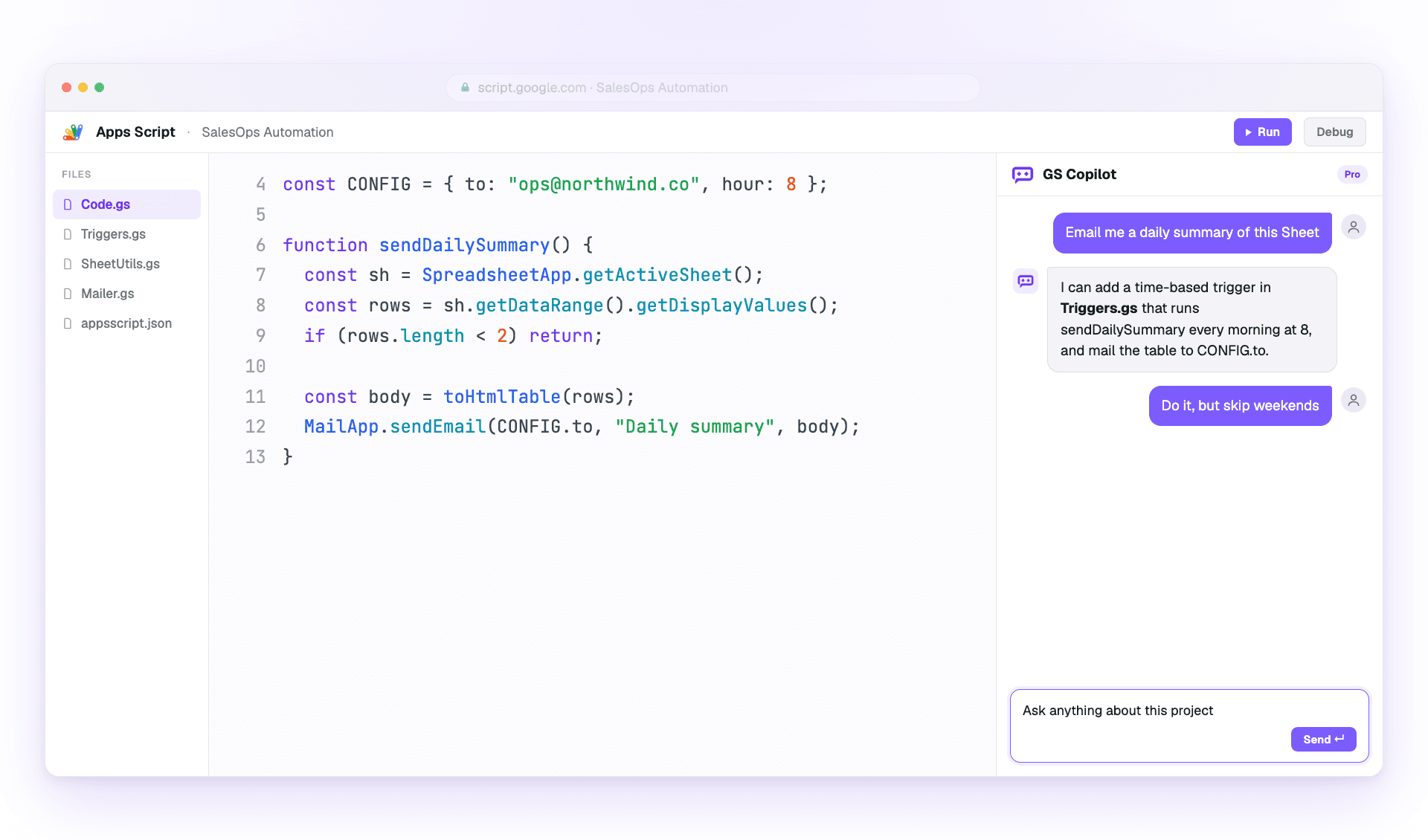
Как использовать Google Apps Script Copilot.

Практическое руководство по работе с AI-помощником: установка, четыре ключевые функции и привычки опытных пользователей.

Начало работы

Установите, войдите и начните за 90 секунд.

Два шага. Без файлов конфигурации. Без CLI. Твой существующий аккаунт Google делает основную работу.

Установка и настройка

Install the Google Apps Script Copilot extension from the Chrome Web Store and sign in with the same Google account you use for Apps Script.

Как сделать
  1. Open the Chrome Web Store listing and add Google Apps Script Copilot to Chrome.
  2. Войти with the Google account that owns your Apps Script projects.
  3. Open script.google.com and refresh the editor once after installing.
Важно помнить
  • Используй аккаунт Google, которому принадлежат твои проекты Apps Script
  • Предоставь запрошенные разрешения, чтобы панель IDE могла загрузиться
  • Закрепи расширение на панели инструментов, чтобы убедиться, что оно загрузилось

Первый проект

Открой любой проект Apps Script (или создай новый). Copilot открывает боковую панель внутри IDE сразу после загрузки проекта.

Как сделать
  1. Open an existing Apps Script project or create a blank one.
  2. Wait for the Copilot panel to appear inside the editor.
  3. Ask a small first question, such as explaining the active file.
Важно помнить
  • Начни с небольшого проекта, чтобы увидеть, как загружается контекст
  • Давай файлам понятные имена — Copilot использует их как опору
  • Сохраняй чаще во время экспериментов; Apps Script хранит версии за тебя
Основные функции

Четыре функции на каждый день.

Master these and you've mastered Copilot. Each workflow is explained in plain steps so you can try it immediately.

Режим чата

Use the side panel to ask questions, debug errors, and request changes with project context already attached.

Как сделать
  1. Open the Copilot panel beside your code.
  2. Describe the outcome you want in one or two sentences.
  3. Review the answer, then ask a follow-up or apply the suggested change.
Важно помнить
  • Чётко формулируй, что хочешь изменить
  • Ссылайся на имена функций вместо вставки кода
  • Use follow-ups; Copilot remembers the thread

Inline-подсказки

Get ghost-text suggestions while you type, then accept only the parts that help.

Как сделать
  1. Place your cursor where the next code should go.
  2. Pause briefly so Copilot can read the surrounding context.
  3. Press Tab to accept or Esc to dismiss the suggestion.
Важно помнить
  • Держи курсор в конце строки для лучшего контекста
  • Write a short comment first when the next step is complex
  • Reject suggestions freely when they do not match your intent

Контекст нескольких файлов

Attach the files that matter so Copilot understands triggers, helpers, libraries, and connected services.

Как сделать
  1. Open the context picker in the panel.
  2. Add the files involved in the task you are working on.
  3. Remove files that no longer matter before asking the next question.
Важно помнить
  • Include only the files the task действительно touches
  • Keep file names descriptive for better grounding
  • Pin important files when you want them kept across the session

История чатов и ветви

Return to saved project conversations or branch from an earlier message when you want to try a different fix.

Как сделать
  1. Open chat history from the Copilot panel.
  2. Select the conversation that matches the project or bug.
  3. Fork from an older message before testing a different approach.
Важно помнить
  • Имя important threads so they are easier to find
  • Fork before trying risky changes
  • Reuse a successful thread on similar bugs
Лучшие практики

Выпускай быстрее, не выпуская баги.

Как опытные пользователи выжимают максимум из Copilot, сохраняя код пригодным для ревью.

Эффективные промпты

Give Copilot the goal, the constraints, and the exact service you are using.

Как сделать
  1. Start with the outcome you want.
  2. Add the current error, file, function, or data shape.
  3. Ask for code plus a short explanation when the change is important.
Важно помнить
  • Начинай с результата, а не с реализации
  • При отладке приводи сообщения об ошибках дословно
  • Specify the service: SpreadsheetApp, DriveApp, or GmailApp
  • Проси пояснения вместе с кодом

Качество и безопасность кода

Treat AI output like a teammate's draft: useful, fast, and worth reviewing before it ships.

Как сделать
  1. Read the generated code before applying it.
  2. Run the smallest safe test you can.
  3. Move secrets into PropertiesService instead of prompts or source code.
Важно помнить
  • Сначала тестируй на копии таблицы
  • Validate every external input from forms or URL params
  • Keep changes small enough to review
  • Never paste secrets into a prompt